· Jakub · Kubernetes · 5 min read
Running RabbitMQ on EKS Without Bitnami — A Cluster-Operator-Based Setup
How we built a RabbitMQ deployment for EKS from scratch on the official Cluster Operator instead of a Bitnami chart, using a thin custom Helm chart and ArgoCD sync-waves.
Introduction
Bitnami’s deprecation of its free-tier images and Helm charts pushed a lot of teams to re-evaluate anything built on top of them. For a client running a Django/Celery-based SaaS platform on EKS, I used that moment to build the RabbitMQ deployment from the ground up on a different foundation entirely: the official RabbitMQ Cluster Operator, driven by a small chart I own end to end, deployed through ArgoCD.
This isn’t a lift-and-shift of an existing broker — it’s a deployment designed from scratch around the operator model, where RabbitMQ handles task queues for the API, backend workers, beat scheduler, and Flower monitoring in the client’s stack.
System Architecture
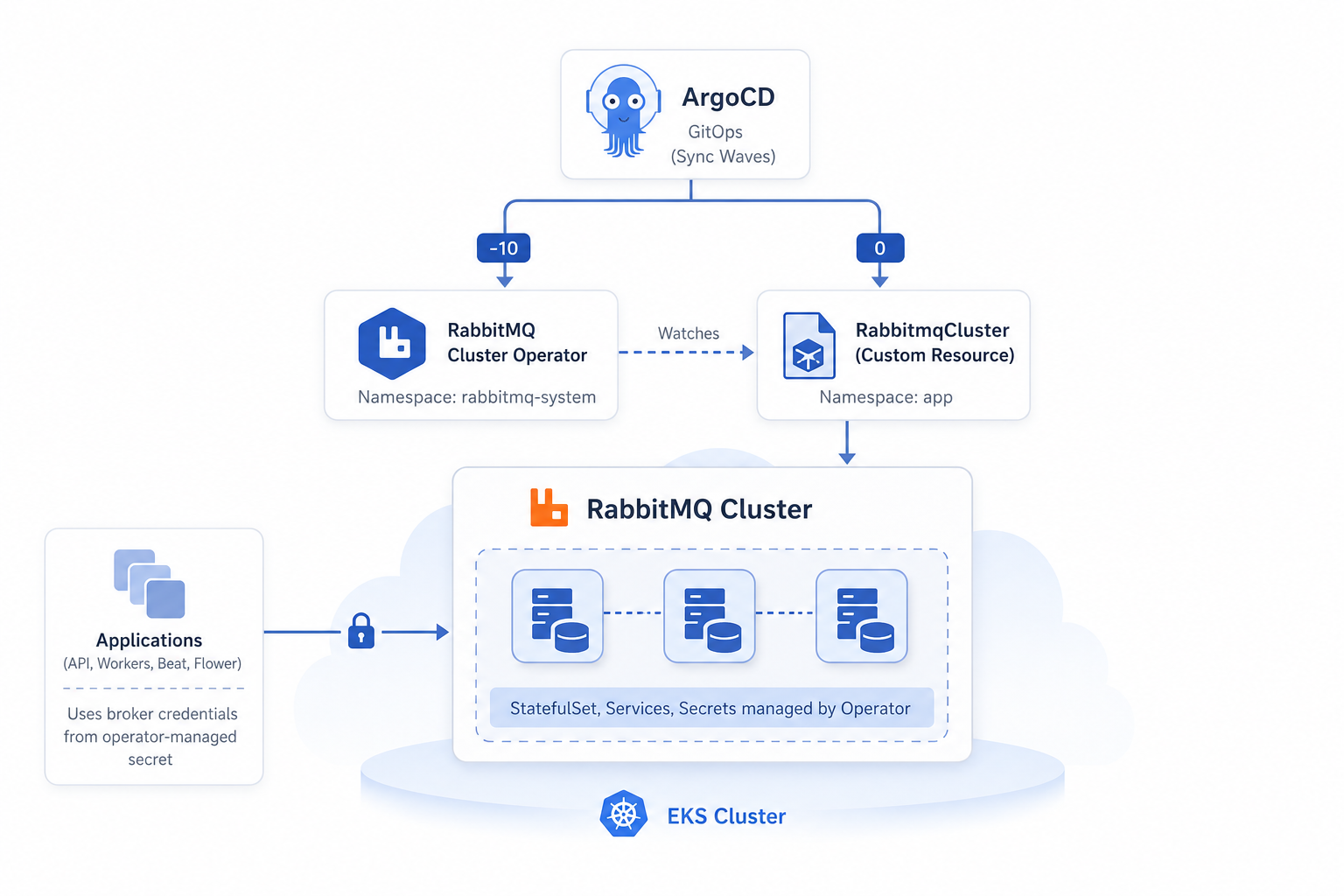
The setup is two separate ArgoCD Application resources, layered deliberately:
1. The operator. Installed directly from the upstream rabbitmq/cluster-operator release manifests, into its own rabbitmq-system namespace, ahead of anything that depends on it:
metadata:
  annotations:
    argocd.argoproj.io/sync-wave: "-10"
spec:
  source:
    repoURL: https://github.com/rabbitmq/cluster-operator.git
    targetRevision: v2.22.1
    path: config/default
  syncPolicy:
    syncOptions:
      - CreateNamespace=true
      - ServerSideApply=true
      - ApplyOutOfSyncOnly=true
The negative sync-wave guarantees the operator’s CRDs and webhooks exist before any RabbitmqCluster object is applied elsewhere in the cluster.
2. A thin Helm chart. Its only job is to render a RabbitmqCluster custom resource — no bundled images, no vendor defaults, just the fields this environment actually needs:
apiVersion: rabbitmq.com/v1beta1
kind: RabbitmqCluster
metadata:
  name: {{ .Values.rabbitmq.name }}
spec:
  replicas: {{ .Values.rabbitmq.replicas }}
  image: {{ .Values.rabbitmq.image }}
  persistence:
    storageClassName: {{ .Values.rabbitmq.storage.className }}
    storage: {{ .Values.rabbitmq.storage.size }}
Everything else — affinity, topology spread, plugins, config, ingress — is templated conditionally from values, and the same chart is reused across environments purely by swapping values files.
Downstream, the CRM application’s API, backend, worker, and beat components read broker credentials from a secret the operator generates and manages itself:
- name: BROKER_URL
  valueFrom:
    secretKeyRef:
      name: rabbitmq-user
      key: connection_string
No credentials are hand-rolled or stored in values files — the operator owns that secret’s lifecycle.
Runtime & Scaling Behavior
The operator reconciles the RabbitmqCluster CR into a StatefulSet, services, and secrets, and owns clustering, leader election, and upgrade orchestration. That’s what keeps the chart small — almost none of that logic needs to be templated by hand.
For environments running more than one replica, the chart conditionally adds pod anti-affinity and zone-aware topology spread:
{{- if .Values.rabbitmq.topologySpread.enabled }}
override:
  statefulSet:
    spec:
      template:
        spec:
          topologySpreadConstraints:
            - maxSkew: {{ .Values.rabbitmq.topologySpread.maxSkew }}
              topologyKey: {{ .Values.rabbitmq.topologySpread.topologyKey }}
              whenUnsatisfiable: {{ .Values.rabbitmq.topologySpread.whenUnsatisfiable }}
{{- end }}
Single-replica environments simply set topologySpread.enabled: false and affinity.enabled: false together — there’s nothing to spread or keep apart, and it keeps scheduling unconstrained on smaller node groups.
The management UI is opt-in per environment via an ingress.enabled flag behind an internal ALB, rather than being exposed by default. The Ingress template itself is guarded by a double condition — it only renders when both the broker and the ingress block are enabled — and loops over hosts/paths so it works whether an environment defines one host or several:
{{- if and .Values.rabbitmq.enabled .Values.rabbitmq.ingress.enabled }}
kind: Ingress
spec:
  ingressClassName: {{ .Values.rabbitmq.ingress.className }}
  rules:
    {{- range .Values.rabbitmq.ingress.hosts }}
    - host: {{ .host | quote }}
      http:
        paths:
          {{- range .paths }}
          - path: {{ .path }}
            pathType: {{ .pathType }}
            backend:
              service:
                name: {{ $.Values.rabbitmq.name }}
                port:
                  number: {{ $.Values.rabbitmq.ingress.port | default 15672 }}
          {{- end }}
    {{- end }}
{{- end }}
Note the $.Values inside the nested range — once you’re two loops deep, . is scoped to the loop variable, so reaching back to the root values needs the $ prefix. It’s a small thing, but it’s the detail that breaks silently if you forget it.
Key Engineering Decisions
Operator-first, not chart-first. Building on the Cluster Operator instead of a community chart means the chart’s job shrinks to “render one CR correctly.” Clustering, failover, and upgrade mechanics live in code maintained by the RabbitMQ team, not in Helm templates maintained by us. That’s a deliberate transfer of risk away from any chart’s release cadence.
No inherited defaults. Starting from the CRD spec rather than adapting an existing chart meant every setting in the chart was added because this deployment needed it, not because a template happened to expose it. The values file stays close to a checklist of actual requirements: storage class, resource limits, plugin list, config lines.
Sync-wave ordering as a first-class concern. Because the operator’s CRDs and webhooks must exist before a RabbitmqCluster can be created, the operator’s Application carries sync-wave: "-10" and ServerSideApply/ApplyOutOfSyncOnly. CRD status fields and webhook caBundle values are excluded from ArgoCD’s diff so the operator’s own controller — not GitOps reconciliation — stays authoritative over them.
Environment-scaled termination grace period. A production-like environment keeps a seven-day termination grace period so queues can drain and rebalance cleanly during node churn:
terminationGracePeriodSeconds: {{ .Values.rabbitmq.terminationGracePeriodSeconds | default 604800 }}A dev environment overrides this down to 60 seconds — a single, disposable broker has nothing worth draining slowly.
Config and plugins scoped per environment. The base config enables rabbitmq_shovel/rabbitmq_shovel_management for cross-cluster forwarding; a lighter dev environment enables only rabbitmq_management, matching what that environment actually uses:
additionalConfig: |
  cluster_partition_handling = pause_minority
  vm_memory_high_watermark.relative = 0.6
  heartbeat = 60
Trade-offs
What was optimized: full control over exactly which RabbitMQ settings are exposed, a deployment pattern (operator + minimal chart) that’s reusable for any future RabbitMQ consumer in the cluster, and independence from any single chart vendor’s maintenance decisions.
What was sacrificed: the convenience of a large, pre-built chart. A community chart ships more out of the box — metrics exporters, more elaborate secret patterns, more defaults already wired up. Owning the chart means every new setting has to be added deliberately. That’s the trade we chose: a smaller surface area we fully understand, over a larger one we don’t control.
Conclusion
Building this on the RabbitMQ Cluster Operator instead of adapting a pre-built chart meant more upfront template work, but it produced a broker deployment where clustering logic lives with its actual maintainer and every configuration knob in the chart is there because it’s used. It’s a pattern worth reaching for any time a message broker needs to sit reliably in a SaaS platform’s request and background-job path.
If you’re building similar systems, feel free to reach out at hello@jakops.cloud.