· Jakub · DevOps · 9 min read
Running Ollama on EKS: A Production-Grade LLM Setup with a Custom Helm Chart
GPU nodes on demand, zero cost at night, models that survive restarts — how I deployed self-hosted Ollama on Amazon EKS using a single Helm chart with Karpenter, KEDA, and ArgoCD.
Why self-host an LLM at all?
Most companies reaching for AI today do it through external APIs — OpenAI, Anthropic, Gemini. That works, until it doesn’t: sensitive data leaving your infrastructure, unpredictable per-token costs at scale, vendor lock-in, no control over the model version.
For one of my clients the answer was clear: run the model inside their own AWS account. No data exfiltration, predictable infrastructure costs, full control.
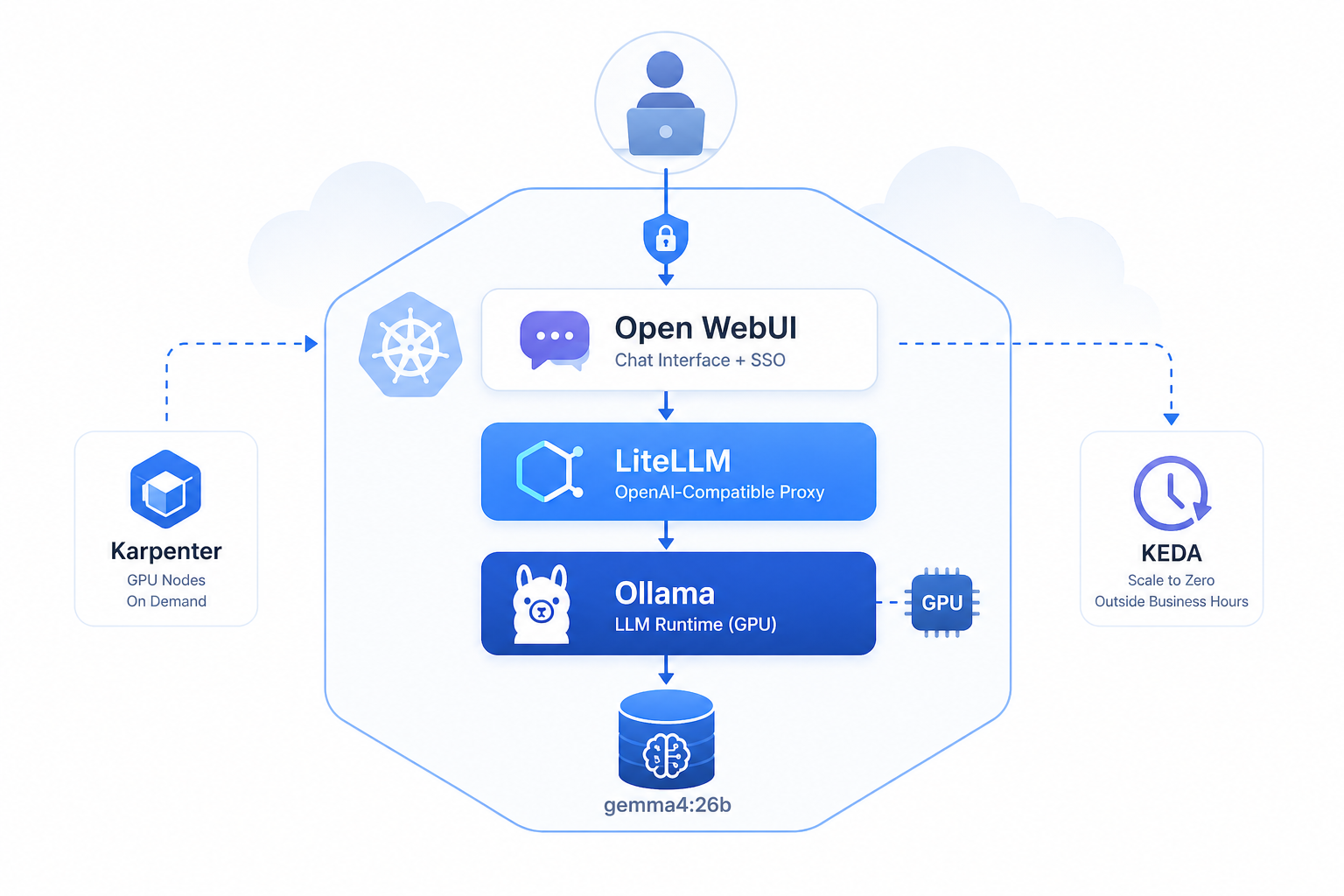
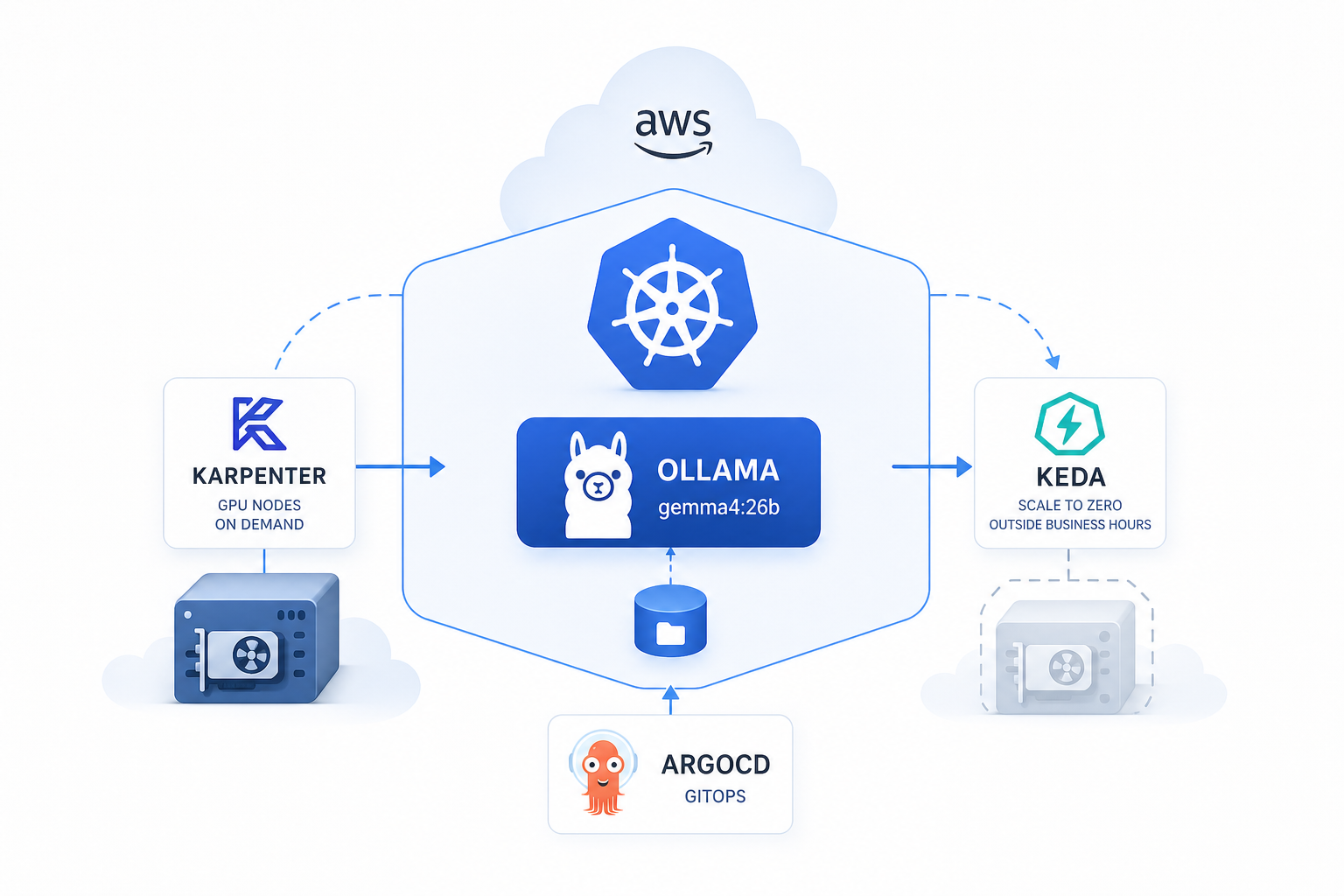
This post covers exactly how I did it — Ollama on Amazon EKS, GPU nodes provisioned on demand by Karpenter, scaled to zero outside business hours by KEDA, everything managed by a single custom Helm chart deployed via ArgoCD.
I design and deploy production AWS/Kubernetes infrastructure for startups and scale-ups.
👉 jakops.cloud
The stack at a glance
| Component | Role |
|---|---|
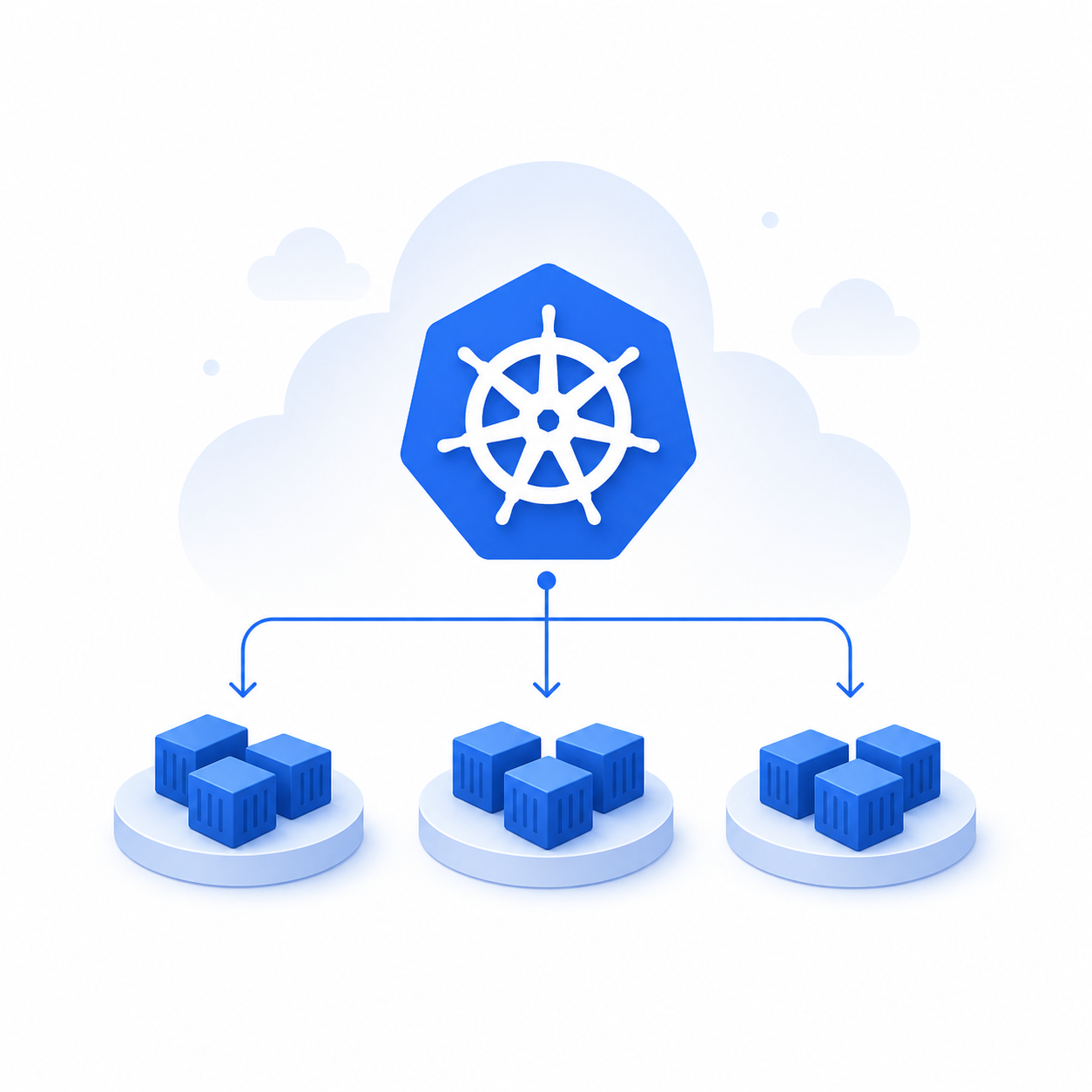
| Amazon EKS | Managed Kubernetes cluster |
| Karpenter | On-demand GPU node provisioning |
| NVIDIA Device Plugin | Exposes GPU resources to Kubernetes |
| Ollama | LLM runtime (gemma4:26b) |
| KEDA | Scale to zero outside business hours |
| External Secrets | Secrets from AWS Secrets Manager |
| ArgoCD | GitOps delivery |
The Helm Chart
Instead of deploying Ollama ad-hoc or piecing together disparate manifests, I built a single Helm chart that owns every resource in the LLM stack — from the Kubernetes Deployment down to the Karpenter node provisioner.
charts/llm/
├── Chart.yaml
├── values.yaml
└── templates/
├── _helpers.tpl        # shared naming helpers
├── deployment.yaml     # Ollama pod with GPU
├── service.yaml        # ClusterIP on port 11434
├── ingress.yaml        # optional ALB ingress
├── pvc.yaml            # persistent volume for models
├── networkpolicy.yaml  # restrict inbound traffic
├── nodepool.yaml       # Karpenter NodePool
├── ec2nodeclass.yaml   # Karpenter EC2NodeClass
├── scaledobject.yaml   # KEDA cron scaler
└── secretstore.yaml    # External Secrets / AWS SM
One chart, one values.yaml, one helm upgrade. ArgoCD syncs it on every git commit.
Chart dependencies
# Chart.yaml
dependencies:
  - name: nvidia-device-plugin
    alias: nvidia
    version: "0.18.0"
    repository: https://nvidia.github.io/k8s-device-plugin
The NVIDIA device plugin is pulled in as a chart dependency — bundled with the rest of the stack, installed automatically. More on why this is critical below.
Shared helpers
All resource names, labels, and namespace resolution live in _helpers.tpl:
{{- define "llm.fullname" -}}
llm-ollama
{{- end }}

{{- define "llm.labels" -}}
app: llm-ollama
environment: {{ .Values.environment }}
project: {{ .Values.project }}
{{- end }}

{{- define "llm.namespace" -}}
{{ .Values.namespace | default .Release.Namespace }}
{{- end }}
Every template references these helpers — rename or move the release and nothing breaks.
Karpenter — GPU nodes only when needed
There are no GPU nodes in the cluster by default. Karpenter provisions one the moment a pod requests nvidia.com/gpu and can’t be scheduled — and terminates it when no pods need it anymore. This alone eliminates a large chunk of idle GPU cost.
EC2NodeClass
Defines the EC2-level properties of provisioned nodes:
# ec2nodeclass.yaml
apiVersion: karpenter.k8s.aws/v1
kind: EC2NodeClass
spec:
  amiFamily: AL2023
  amiSelectorTerms:
    - alias: al2023@v20251108   # pinned AMI — no surprise driver updates
  blockDeviceMappings:
    - deviceName: /dev/xvda
      ebs:
        volumeSize: 100Gi
        volumeType: gp3
        deleteOnTermination: true
  metadataOptions:
    httpTokens: required        # IMDSv2 enforced
    httpPutResponseHopLimit: 2
  userData: |
    [settings.kubernetes]
    max-pods = 110
Subnets and security groups are discovered automatically via karpenter.sh/discovery tags — no hardcoded IDs.
NodePool
Defines which instance type is eligible, resource limits, and the taint applied to all GPU nodes:
# nodepool.yaml
apiVersion: karpenter.sh/v1
kind: NodePool
spec:
  template:
    metadata:
      labels:
        workload: llm
        nvidia.com/gpu.present: "true"
    spec:
      requirements:
        - key: karpenter.sh/capacity-type
          operator: In
          values: ["spot", "on-demand"]   # spot first, on-demand fallback
        - key: node.kubernetes.io/instance-type
          operator: In
          values: ["g6e.2xlarge"]         # NVIDIA L40S GPU
        - key: kubernetes.io/arch
          operator: In
          values: ["amd64"]
      taints:
        - key: nvidia.com/gpu
          effect: NoSchedule
          value: "true"
  limits:
    cpu: "32"
    memory: 256Gi
    nvidia.com/gpu: "1"
  disruption:
    consolidationPolicy: WhenEmptyOrUnderutilized
    consolidateAfter: 1s       # terminate the node almost immediately when idle
    budgets:
      - nodes: "100%"
A few things worth noting:
- Spot + on-demand — Karpenter tries spot first. If unavailable, falls back to on-demand. For a workload that can tolerate interruption (and restarts fast thanks to model caching on EBS), spot makes sense.
consolidateAfter: 1s— the node is terminated as soon as it’s empty. Combined with KEDA scaling to zero, this means no lingering idle GPU instances.nvidia.com/gpu.present: "true"label — used by the pod affinity rule to prefer these nodes.
Both nodePool and ec2NodeClass are guarded by enabled flags — if Karpenter is managed at the cluster level separately, just set them to false.
NVIDIA Device Plugin — the piece everyone forgets
Here’s a gotcha that catches people off guard: provisioning a GPU node is not enough.
Without the NVIDIA device plugin running as a DaemonSet on each GPU node, Kubernetes has no visibility into the GPU. Resource requests for nvidia.com/gpu are treated as an unknown extended resource — pods stay Pending indefinitely with no obvious error message.
The plugin is bundled as a Helm chart dependency:
dependencies:
  - name: nvidia-device-plugin
    alias: nvidia
    version: "0.18.0"
    repository: https://nvidia.github.io/k8s-device-plugin
What it does:
- Runs as a DaemonSet — automatically present on every GPU node as it joins
- Registers
nvidia.com/gpuas a schedulable extended resource in the Kubernetes API - Enforces GPU isolation — each container gets exclusive access to the GPU(s) it requested
Because it’s a chart dependency, there’s zero operational gap between a new node joining the cluster and its GPU becoming schedulable. No separate install step, no forgetting about it.
The AMI (
al2023@v20251108) ships with NVIDIA drivers pre-installed forg6einstances. The device plugin just needs to be running — and it always is.
Deployment — GPU scheduling, model pull, probes
Toleration + node affinity
The pod tolerates the GPU taint and prefers nodes labelled workload: llm (set by Karpenter’s NodePool):
tolerations:
  - key: nvidia.com/gpu
    operator: Exists
    effect: NoSchedule

affinity:
  nodeAffinity:
    preferredDuringSchedulingIgnoredDuringExecution:
      - weight: 100
        preference:
          matchExpressions:
            - key: workload
              operator: In
              values: ["llm"]
Resource requests
resources:
  requests:
    memory: "32Gi"
    cpu: "6"
    nvidia.com/gpu: "1"
  limits:
    memory: "60Gi"
    cpu: "8"
    nvidia.com/gpu: "1"
Model pull via postStart hook
The model is pulled at runtime rather than baked into the image. A 10-second sleep gives Ollama time to fully initialise before the pull begins:
lifecycle:
  postStart:
    exec:
      command:
        - /bin/sh
        - -c
        - |
          sleep 10
          ollama pull gemma4:26b
Controlled by model.pullOnStart: true in values.yaml. When persistence is disabled (as in this setup — more below), the model is pulled on every pod start.
Health probes
LLM startup is slow. Probes are tuned accordingly — liveness kicks in after 60s, readiness after 30s:
livenessProbe:
  httpGet:
    path: /
    port: http
  initialDelaySeconds: 60
  periodSeconds: 30
readinessProbe:
  httpGet:
    path: /
    port: http
  initialDelaySeconds: 30
  periodSeconds: 10
Persistence — a deliberate trade-off
In this deployment persistence.enabled is set to false — the model volume uses emptyDir.
Why? Because Karpenter provisions nodes with a 100Gi gp3 root EBS volume (deleteOnTermination: true). The model is written to the node’s local disk on first start and lives there for the lifetime of the node. When KEDA scales the pod to zero and Karpenter terminates the node, the disk is gone — and the model is re-pulled on the next scale-up.
This is an acceptable trade-off here because:
- The node is almost always terminated and re-provisioned together with the pod (scale-to-zero cycle)
- A separate PVC would persist the volume even when the node is gone, adding EBS cost for no benefit
gemma4:26bpulls in a few minutes — startup time is dominated by model loading into VRAM anyway
If you run Ollama on a long-lived node or have minReplicaCount: 1, a PVC makes more sense.
KEDA — scale to zero, cut GPU costs
A g6e.2xlarge (NVIDIA L40S) costs around $1.3–1.6/hour on-demand, significantly less on spot. Running it 24/7 for a model used only during business hours is pure waste.
KEDA’s cron trigger solves this:
# scaledobject.yaml
apiVersion: keda.sh/v1alpha1
kind: ScaledObject
spec:
  scaleTargetRef:
    kind: Deployment
    name: llm-ollama
  minReplicaCount: 0
  maxReplicaCount: 1
  triggers:
    - type: cron
      metadata:
        timezone: "UTC"
        start: "0 8 * * 1-5"    # up at 08:00 UTC Mon–Fri
        end: "0 16 * * 1-5"     # down at 16:00 UTC
        desiredReplicas: "1"
When replicas hit 0, Karpenter’s consolidateAfter: 1s policy kicks in and terminates the GPU instance within seconds. Outside business hours, compute cost is zero.
The paused annotation is also templated — flip keda.paused: true to freeze scaling during maintenance:
{{- if .Values.keda.paused }}
annotations:
  autoscaling.keda.sh/paused: "true"
{{- end }}
Service and Network Policy
Ollama is exposed as ClusterIP on port 11434 — not publicly accessible, internal cluster traffic only.
NetworkPolicy restricts inbound connections to explicitly whitelisted pods:
networkPolicy:
  enabled: true
  ingress:
    - podSelector:
        app: llm-proxy
      ports:
        - port: 11434
The allowed sources are fully data-driven in values.yaml and rendered with a range loop in the template — adding a new consumer is a one-liner, no template changes needed.
GitOps with ArgoCD
The chart is delivered via ArgoCD. Key resources carry sync-wave: "2" to ensure namespace and secrets exist before application resources are applied:
annotations:
  argocd.argoproj.io/sync-wave: "2"
The full operational workflow:
git commit (values.yaml change)
  → ArgoCD detects diff
    → helm template
      → kubectl apply
Change the model, adjust resource limits, update the cron schedule, swap the instance type — one line in values.yaml, zero manual steps.
Cost estimate (eu-central-1, spot pricing)
| Resource | Est. cost |
|---|---|
g6e.2xlarge spot × 8h/day × 22 days | ~$115–140/month |
| Root EBS 100Gi gp3 (node lifetime only) | ~$2–3/month |
| vs. 24/7 on-demand baseline | ~$1,100+/month |
| Savings | ~85–90% |
Summary
| Concern | Solution |
|---|---|
| GPU provisioning | Karpenter — nodes exist only when a pod needs one |
| GPU visibility in K8s | NVIDIA device plugin as chart dependency |
| Cost optimization | KEDA cron → scale to zero + Karpenter terminates node |
| Spot resilience | Karpenter tries spot first, falls back to on-demand |
| Model storage | Node-local EBS root volume (no idle PVC cost) |
| Network isolation | NetworkPolicy — allowlist only |
| Secrets | External Secrets + AWS Secrets Manager |
| Delivery | GitOps via ArgoCD — one values.yaml to rule them all |
The entire LLM infrastructure — from EC2 node class to Ollama API — is described in a single Helm chart. Deploying to a new environment means overriding a handful of values. No runbooks, no ClickOps, no surprises at 2am.
Need Help Running Self-Hosted LLMs on Kubernetes?
If you’d rather skip the trial-and-error and get a production-ready LLM deployment from day one — that’s exactly what I do at jakops.cloud.
I can help you with:
- Deploying Ollama or other LLM runtimes on EKS with GPU nodes provisioned on demand
- Building custom Helm charts that own the full stack — Karpenter, KEDA, NVIDIA plugin, and all
- Configuring KEDA cron scalers to eliminate idle GPU costs outside business hours
- Integrating External Secrets Operator with AWS Secrets Manager via IRSA
- GitOps delivery with ArgoCD for zero-touch model and infrastructure updates
📩 Book a free 30-minute infrastructure audit — I’ll review your current setup, identify the gaps, and tell you exactly what needs to change.
No fluff. Just actionable advice from someone who’s done this in production.
jakops.cloud — AWS & Kubernetes DevOps services